CodeWords Cryptogram Puzzles
- 4.6
- Rating
- 100.00K
- Installs
- Free
- Price
 Analysis by App-foxy
I picked up CodeWords: Cryptogram Puzzles expecting a quiet word game for short breaks, but its best quality became clearer when I treated it as something two people could share on the same device. One person can work through a clue, hand the phone over when a phrase gets difficult, and compare ideas without turning the session into a competitive race. That makes it a pleasant household game, although it is still designed around individual puzzle solving rather than a formal family or multiplayer system.
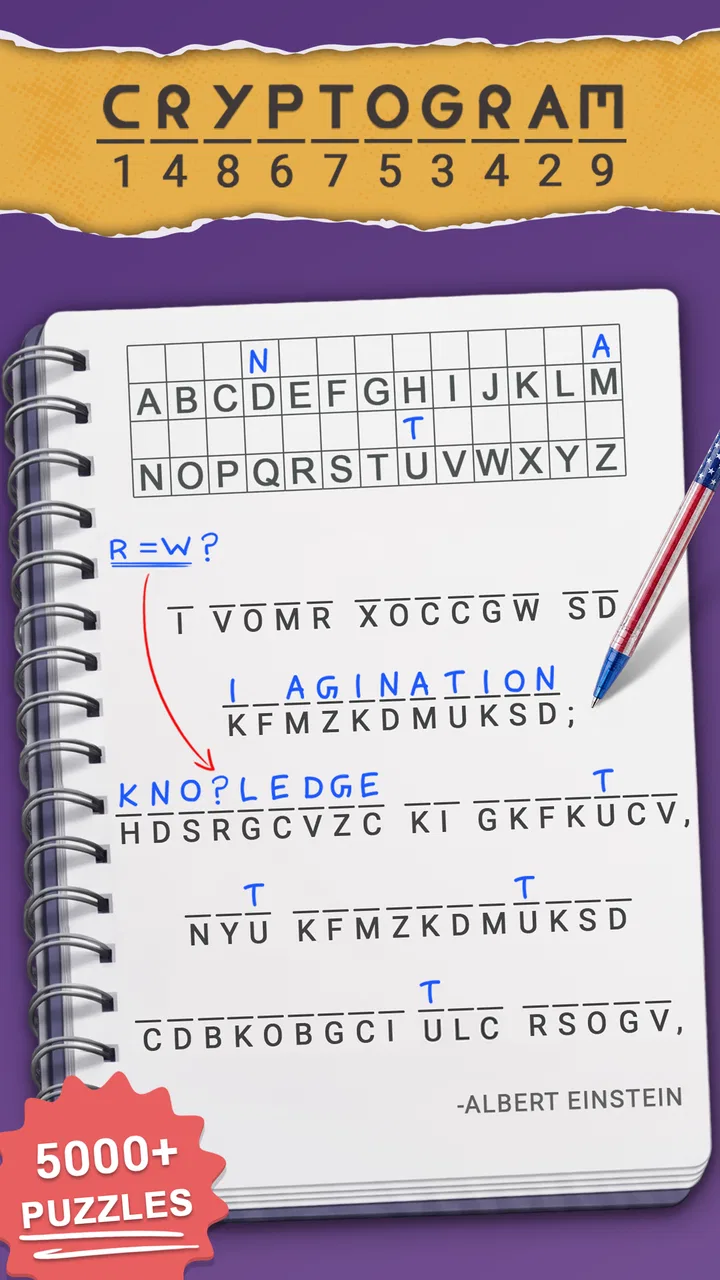
At its core, this is a word game from QuriousBit Games built around cryptograms: encoded text that you decode to reveal a hidden message. The appeal is not speed alone. You are looking for patterns, testing likely letters, and deciding whether a partial word makes sense in the wider sentence. I like that the basic activity feels more thoughtful than simply guessing a word from a picture or tapping a fast answer.
The game is free to start and suitable for Everyone, which makes it easy to try on a shared household phone or tablet. It has reached over 100 thousand installs and holds a 4.6 average from around 2.9 thousand ratings, so there is already a meaningful group of players behind it. Those figures suggest a healthy reception, but I still found that its value depends heavily on whether you enjoy patient language puzzles rather than instant, highly guided entertainment.
You May Also Like

 Blood Strike: 2.5 Anniversary
Blood Strike’s Loadouts Turn Every Drop Into a Tactical Gamble
A close look at Blood Strike’s custom loadouts: how fast access to signature weapons reshapes its battle royale rhythm, rewards preparation, and narrows the gap between fights.

 Pandora - Music & Podcasts
Pandora’s Music Is Easy to Start, but Harder to Recover
Pandora’s strength is its low-effort path from a seed to a station. Its weak spot is how much confidence it asks you to place in connection, setup, and quiet recovery.

 8 Ball Pool
 Is Built on Rivalries, Rematches, and Routine
A close look at the rivalries, rematches, shared routines, and unanswered safety questions that turn a quick pool match into a persistent mobile community.

 Samsung Music
’s Quiet Strength Is Playing What You Already Own
Its reach comes less from spectacle than from dependable access to a personal library. That simplicity is both the app’s strongest retention engine and its ceiling.

 AccuWeather: Weather Radar
AccuWeather Review: A Quick, Clear Forecast for Everyday Decisions
For everyday plans, the best forecast is the one you can understand quickly. AccuWeather makes rain timing, radar, and local conditions easy to act on, with a few trade-offs.

 Hill Climb Racing
Why Hill Climb Racing Still Turns Crashes Into One More Run
A tiny car, a bumpy hill and one more upgrade: Hill Climb Racing keeps resurfacing because its simple chaos makes every near-miss feel personal.
More From Our News Desk



How CodeWords works in a shared household
When I bring CodeWords into a shared household, I find it works best as an invitation to think together rather than a pass-and-play contest. Let one person explain the pattern they are testing before handing over the device; that keeps the reasoning visible and makes suggestions easier to weigh. This kind of low-pressure teamwork also raises a practical question: how can different ages and puzzle-solving styles share the activity without one person taking over?
A puzzle that works well in short, informal turns
My favorite way to use the game is in small sessions. Someone starts a puzzle while waiting for dinner, during a quiet coffee break, or on the sofa after a long day. The first player can identify a few letters, then ask another person to look at the pattern. That simple handoff creates a natural conversation: one person notices a repeated symbol, while the other recognizes what the sentence may be trying to say.
This shared-device style works because cryptograms are easy to understand when viewed together. You do not need a long explanation before another person can contribute. A child who enjoys words may suggest possible endings, while an adult may be better at spotting a familiar phrase. The game therefore has a gentle collaborative quality even though it does not need to be described as a dedicated family activity.
There is also a useful difference between helping and taking over. If I solve every difficult section for someone else, the game loses its purpose. A better household routine is to give one hint at a time: first point out a repeated character, then suggest looking for a short connecting word, and only later discuss a possible phrase. That keeps the person holding the device involved instead of turning the session into a spectator exercise.
Why the format suits conversation better than many word games
Many familiar word games are built around a timer, a score, or a fixed number of attempts. Those formats can be fun, but they make shared play feel like a contest. Here, the main tension comes from interpretation. You are weighing possibilities and correcting assumptions. That makes it easier for people with different skill levels to play together without the stronger player winning immediately.
Compared with a crossword, a cryptogram usually gives me a more continuous thread to follow. A crossword lets me jump between clues, while an encoded message encourages me to use the relationships between letters and words. Compared with a word-search game, it asks for more reasoning and less visual scanning. Compared with a daily guessing game, it offers a longer chain of deduction instead of one compact answer.
That trade-off matters. If you want a quick success in under a minute, this may feel slow. If you like the moment when a confusing line suddenly becomes readable, it has more staying power than many lightweight word apps. I would recommend it to someone who enjoys language as a puzzle, not simply to anyone looking for an idle game with words in the title.
Setting expectations before several people use one device
Because the game is free, it is tempting to install it and let everyone in the home use the same copy without thinking about boundaries. I would still agree on a simple routine first. Decide whether the device belongs to one player, whether people may solve the same puzzle together, and whether anyone should spend money inside the game. That conversation is more important than it sounds, especially when a younger player uses an adult’s phone.
The store information lists in-app purchases ranging from $0.99 to $99.99 per item. I would not hand the device to a child without discussing purchases beforehand, and I would avoid treating the free download as proof that every part of the experience is cost-free. The safest household habit is to keep payment decisions with the device owner and make sure a child understands that tapping a purchase is not part of solving the puzzle.
I also prefer keeping separate expectations for progress. If several people use one device, the next puzzle or current state may not represent one person’s work. That is not a problem for casual cooperation, but it can become frustrating if one player wants a personal record or a clean sequence of solved challenges. The app works best in a household when shared play is treated as a common activity rather than as a precise personal log.
Coordination without turning the game into homework
A small amount of coordination makes the experience noticeably better. I would suggest choosing a regular time for a joint puzzle, then letting the person who starts it make the first attempt without interruption. After that, invite suggestions from the room. This gives everyone a role while preserving the satisfaction of discovery.
Another useful approach is to separate observation from guessing. One person can read the encoded line aloud and describe repeated symbols, while another proposes likely words. This avoids the common problem where everyone blurts out unrelated guesses. It also helps younger players learn how pattern recognition works without feeling that they are being tested.
For a mixed-age household, I would keep sessions flexible. A difficult cryptogram can be a good challenge for an adult, but a child may enjoy solving only part of it. There is no need to insist on finishing every puzzle in one sitting. Pausing after identifying a few patterns can be more enjoyable than pushing through frustration, especially when the device is being shared with someone who has a different attention span.
Age suitability and the role of trust
The Everyone rating makes the game broadly approachable, and the central activity is word decoding rather than action or competition. Even so, an age label cannot decide whether a particular child is ready to use a shared device independently. The more relevant questions are whether the child can read the puzzle comfortably, understands that guesses may be wrong, and knows to ask before interacting with anything related to spending.
I would also introduce the game differently depending on the player. With a confident reader, I would explain that repeated symbols often provide useful clues. With a younger learner, I would focus on finding familiar short words and celebrating partial progress. The game can support careful thinking, but it should not be presented as a lesson disguised as entertainment. Its strongest educational value appears naturally when players discuss why a letter or word is likely to fit.
Trust matters because shared devices blur personal boundaries. A child may assume that anything visible on an adult’s phone is available to tap, while an adult may assume that a free game cannot create a spending issue. I would establish one clear rule: solving is open to everyone in the household, but account and payment decisions belong to the owner. That rule is simple enough for a child to remember and avoids making the game responsible for household arrangements it was not built to manage.
What I noticed after spending more time with the puzzles
The first non-obvious strength is that cryptogram solving rewards keeping several possibilities alive. I initially wanted to commit to the first plausible word, but that often led me down a wrong path. A better method is to mark uncertain letters mentally, use repeated characters as anchors, and wait until the surrounding phrase confirms the guess. This makes the game feel less like random trial and error.
The second insight is that a shared session benefits from reading the whole message before focusing on one difficult word. Even when individual symbols are unclear, the sentence structure can suggest whether you are looking at a verb, a short connector, or the beginning of a familiar expression. In practice, this is often more useful than staring at an isolated cluster of letters.
The third trade-off is that the same thoughtful design that makes the game satisfying can make it awkward during noisy or distracted moments. If I am checking the puzzle while answering messages or talking with someone, I lose track of which symbol pattern I was testing. This is not a game I would choose for a crowded commute when I want constant, effortless progress. It rewards a little concentration.
A fourth practical tip is to use the device handoff as part of the solving method. Rather than asking another player to finish the puzzle, show them the exact point where your reasoning stopped. They may see a repeated letter or sentence pattern that you overlooked, and you still retain ownership of the solution. This turns the household setting into a genuine advantage instead of merely putting several people around one screen.
Version, access, and everyday practicality
The current version is 1.124.0, and the game requires at least iOS or Android version 11. That requirement is worth checking before installing on an older household device. A shared tablet can be ideal for this kind of game because the larger screen makes the encoded text easier for several people to inspect, but only if the operating system is compatible.
Since the game is free, trying it does not require a purchase at the starting point. I still see the in-app purchase range as an important part of the decision for families, particularly if the device is used by children or guests. I would install it first on the owner’s device, explore the opening experience, and then decide whether it is appropriate for shared use. That is a more sensible workflow than giving unrestricted access immediately.
The game’s release date was Aug 8, 2025, which places it among relatively recent word-game options. I would not choose it on recency alone. What matters more is whether its cryptogram format matches the household’s interests. A family that prefers visual puzzles, trivia, or fast word races may find the central mechanic too deliberate, while readers and language fans are more likely to settle into it.
Who should choose it, and who should look elsewhere?
I think it is a strong choice for someone who likes decoding phrases, spotting language patterns, and working through a problem without a countdown dominating every move. It is also a good candidate for a parent and child to explore together, provided the adult sets clear expectations around the shared device and purchases. Couples, roommates, and friends can use it in the same way: one person begins, the other contributes, and neither needs to be equally skilled.
I would skip it if your ideal word game is a rapid daily challenge with a clearly defined finish. I would also look elsewhere if you need formal player profiles, robust household controls, or a built-in way to keep everyone’s progress separate. The available information makes it suitable for casual shared use, but I would not confuse that with a dedicated family-management tool.
Players who dislike ambiguity may also become impatient. A cryptogram can leave you with several plausible interpretations before the sentence resolves. That uncertainty is the point for me, but it will feel like friction to someone who prefers direct clues and immediate confirmation. In that case, a crossword with independent clues or a straightforward word-search game may be a better everyday alternative.
My household verdict
After using it as both a solo puzzle and a shared-device activity, I see CodeWords: Cryptogram Puzzles as a calm, conversation-friendly word game rather than a full family platform. Its best moments come when two people notice different parts of the same hidden message and gradually bring them together. It does not need loud competition to hold attention, and that makes it unusually comfortable in a household setting.
I would recommend starting with short sessions, agreeing who controls purchases, and treating progress as shared if several people use the same device. Those three habits remove most of the practical friction. I would also keep expectations realistic: the game may challenge a younger reader, and a difficult puzzle may need to wait until everyone has the patience to think carefully.
For me, the deciding question is simple: do you enjoy the process of uncovering language, or do you mainly want quick word-game rewards? If you enjoy the process, this free game from QuriousBit Games is easy to recommend, especially for quiet breaks and cooperative solving. If you need separate accounts, formal family controls, or rapid-fire play, I would choose a different category of word game instead. Its strength is focused deduction, and its household value comes from sharing that deduction thoughtfully.
FAQs for CodeWords Cryptogram Puzzles
01What is CodeWords: Cryptogram Puzzles?
CodeWords: Cryptogram Puzzles is an engaging puzzle game designed for both Android and iOS platforms. It challenges players to decode encrypted messages using logic and reasoning skills. Each letter in the cryptogram stands for another letter, and players must figure out the correct substitutions to reveal the hidden message.
02How does the gameplay work in CodeWords?
The gameplay involves solving cryptograms, where each puzzle consists of a short, encrypted text. Players need to use clues and logical deductions to replace the enciphered letters with the correct ones. The app offers hints and the option to check for errors, making it accessible for beginners while still challenging for seasoned players.
03Is CodeWords suitable for all age groups?
Yes, CodeWords: Cryptogram Puzzles is designed to be family-friendly and suitable for all age groups. The puzzles range in difficulty, allowing both younger players and adults to enjoy the challenge. The app’s intuitive interface and helpful hints ensure that even those new to cryptograms can easily get started.
04Are there in-app purchases in CodeWords?
CodeWords: Cryptogram Puzzles is free to download, but it does offer in-app purchases. These purchases typically include additional hints and puzzle packs. While the app provides a substantial amount of free content, players who wish to expand their experience can opt for these premium features.
05Can I play CodeWords offline?
Yes, one of the appealing features of CodeWords: Cryptogram Puzzles is the ability to play offline. Once the app and its content are downloaded, players can enjoy solving puzzles without an internet connection, making it perfect for travel or situations where Wi-Fi access is limited.
Pros
- Challenging puzzles enhance critical thinking.
- Wide variety of cryptograms to solve.
- User-friendly interface with intuitive controls.
- Regular updates with new puzzles added.
- Offline mode available for on-the-go play.
Cons
- Limited hints can frustrate beginners.
- Ads may interrupt gameplay frequently.
- No option for custom cryptogram creation.
- In-app purchases can be pricey for extras.
- Some puzzles may feel repetitive over time.

CodeWords Cryptogram Puzzles
Gallery